Here we go witht he step by step guide on BADI implementation. In the first 2 posts, we have seen about the creation of
BADI and about the fallback class. Here is the quick link of earlier posts. Post 1 & Post 2 . In this last post of this BADI series, we'll
see about BADI implementation.
First Approach:
Go to the enhancement spot and click on the create BADI
implementation button.

Give the Enhancement Implementation name and it's
description. What enhancement spot is to BADI, the same is Enhancement
implementation to BADI implementation. Enhancement implementation contains the
BADI implementation.


Because we have a fallback class in place, we will get the
below information.

Click on empty class.


Click on method to implement it.

activate every object. Now execute the program which we
created in last post, where we use this BADI. Earlier because there was no
active BADI implementation, fallback class's method was executed. This time
because an implementation does exist, method from implementation should be
called.

The highlighted text is coming from BADI implementation.
Second approach:
Because we have created this BADI, so we are aware about the enhancement spot name and everything. Otherwise in daily business when technical developer doesn't know about which BADI needs to be implemented, we take help of method GET_INSTANCE of class CL_EXITHANDLER. This class comes into picture whenever a BADI comes in a code. GET_INSTANCE method gives us all the BADI names which are being used in a screen. So all we have to do is to put a breakpoint at this method and do the normal execution. Everytime control stops at this breakpoint means a BADI has been used and parameter EXIT_NAME of method GET_INSTANCE gives us the BADI name. These BADIs are the classic BADIs. In SE19 we have that option of New BADI and Classic BADI. So now we have the BADI name and we need to implement it.
Goto SE19. In create implementation block, choose the classic BADI option and give the BADI name.

Click on Create implementation button


We can see the implementing class here and we have 2 methods here. We can go inside that methods to implement it.
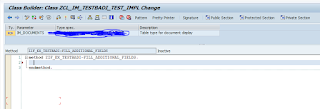
So this is how we implement the classic BADIs.
Happy Learning :)
Second approach:
Because we have created this BADI, so we are aware about the enhancement spot name and everything. Otherwise in daily business when technical developer doesn't know about which BADI needs to be implemented, we take help of method GET_INSTANCE of class CL_EXITHANDLER. This class comes into picture whenever a BADI comes in a code. GET_INSTANCE method gives us all the BADI names which are being used in a screen. So all we have to do is to put a breakpoint at this method and do the normal execution. Everytime control stops at this breakpoint means a BADI has been used and parameter EXIT_NAME of method GET_INSTANCE gives us the BADI name. These BADIs are the classic BADIs. In SE19 we have that option of New BADI and Classic BADI. So now we have the BADI name and we need to implement it.
Goto SE19. In create implementation block, choose the classic BADI option and give the BADI name.

Click on Create implementation button


We can see the implementing class here and we have 2 methods here. We can go inside that methods to implement it.

So this is how we implement the classic BADIs.
Happy Learning :)


